|
|
 |
|
|

Analyze photo with artificial intelligence, fix or improve the photo quality.
|
Auto-Fix
The unique award winning PhotoRite Auto-Fix function can automatically correct photos with problems including backlit, under-exposure, uneven-illumination and poor contrast. Auto-fix is also available in batch mode.
|
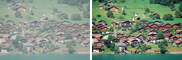
Haze removal
|
Skin Cleaner
Get smooth and pretty skin with just a click. Simply click on where you want to be smooth. Freckle and mole will be removed with no effort.
|
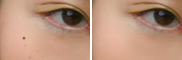
Mole removal
|
Noise Removal
For photos taken with high ISO value, random noise will be obvious, especially in flat area e.g. sky. Single click to reduce the noise level automatically.
|

Noise removal
|
 |
|
|

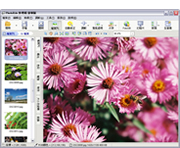
Clear and simple user interface. User can access the required functions easily.
|
Layout Mode
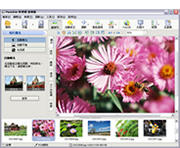
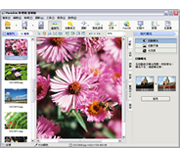
3 different layout modes are provided to fit different personal needs.
 |
 |
 |
|
 |
| Layout 1 | |
Layout 2 | |
Layout 3 |
|
Main Toolbar
Frequently used features are gathered in the main toolbar, and classified into different categories as large buttons for easy access.
|
Status Bar
Display information, including coordinate, pixel color, filename, filesize, of the crrently opened file. Also show application messages and function description.
|
|
|
|

Add innovative effects to have fun!
|
Slim Up
Instant slim up your body or face. To apply, simply click on where you want to slim up.

|
|
Portrait Softening
Simulate the effect of using a softening filter in SLR camera. Good for portrait photos.

|
` Pixelate
To hide the area that don't want to
show, "pixelate" it!

|
|
Sepia Photo
Turn the photo into sepia, giving the air of romance.

|
|
|
|

No more time waste on retouching every photo! Batch processing a large amount of photos in a single time. Batch functions include auto-fix, resize, rotate/flip, file rename, insert date, insert watermark, file format conversion.
|
Batch Insert Date
Insert photo capture date to the bottom right corner of photos. The date can be extracted from the EXIF header of JPEG images or defined by user.

|
|
Batch Insert Watermark
Insert a watermark image for a lot of photos at one time. Users can also use their own images as watermark.

|
|
|
|

Easily share photos with friends and family.
|
Passport Photo Making
Select the head region required from a photo. Generate another image tiled with the selected portion, of the required passport photo size and ratio. Such image can then be used for printout.

|
|
Index Image Generation
Generate image index which contains thumbnail of photos. Such index facilitates Internet browsing and photo ordering for your friends.

|
Upload to web album, FotoGB
FotoGB.com provides Web Album services (http://www.fotogb.com). User can upload photos and manage web album through the software after registering a FotoGB.com account.

|
|
|
|

|
- Auto-fix, auto exposure, auto level, brightness adjust
- Color balance, color casting removal, color saturation
- Purple fringe removal, red eye removal
- Sharpness, contrast, noise reduction
- Black & white, sepia, portrait softening
- Skin cleaner, pixelate, magic mirror, slim up, body reshape
- Image resize, crop, rotate, canvas size
- Photo frame, insert watermark logo, insert text
- Batch auto-fix, resize, rotate/flip, file rename
- Batch add date, watermark, image format conversion
- Set wallpaper, print photos, upload photo to FotoGB.com
- Passport photo making, web album generation, photo index generation
- Custom settings, multi-languages, layout modes
- Undo/Redo
- Full screen viewing, slide show
- Color histogram, EXIF reader
- TWAIN device image acquisition (e.g. web cam, scanner)
- And much more...
|
|
|
|
|